KP AI Music & Song Maker
- 4.3
- Rating
- 500.00K
- Installs
- Free
- Price

 Analysis by App-foxy
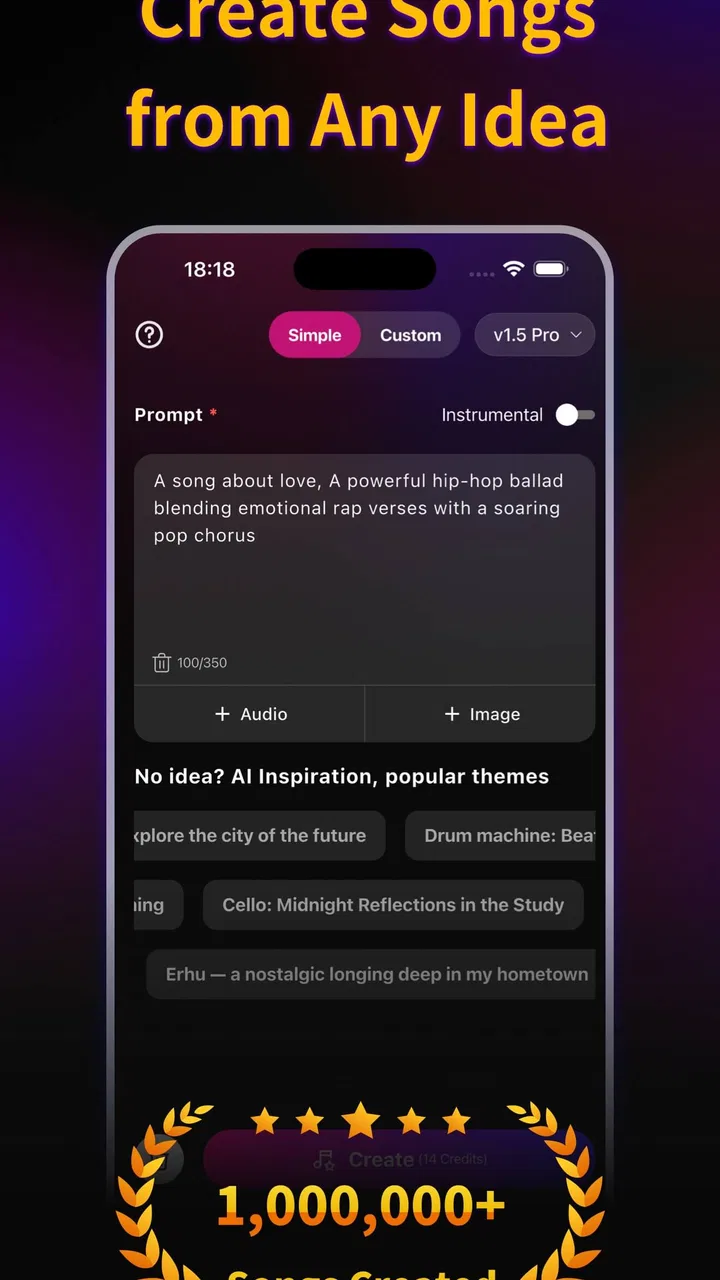
I approached KP AI Music & Song Maker as a quick songwriting companion rather than a replacement for a full recording studio. That distinction matters. The app is built around creating original songs with artificial intelligence, and in my experience its biggest appeal is how quickly it turns a rough musical idea into something I can listen to, rethink, and use as a starting point. It is less about mastering every production detail and more about removing the intimidating blank page.
For someone who has a melody in mind, needs background music for a personal project, or simply wants to experiment with song ideas from a phone, that focus makes sense. I can see why the app has attracted an average rating of 4.3 from around 28 thousand ratings and more than 500 thousand installs. At the same time, I would not recommend it blindly to every musician. The convenience of AI generation comes with trade-offs in control, consistency, and the feeling of personal authorship.
What using KP AI Music feels like in practice
The first thing I noticed is that the app fits naturally into short creative sessions. I do not need to sit down with a keyboard, microphone, or complicated desktop arrangement just to test an idea. I can open it when a concept occurs to me and use the song-maker approach to explore a possible direction before deciding whether the idea deserves more work.
You May Also Like

 Blood Strike: 2.5 Anniversary
Blood Strike’s Loadouts Turn Every Drop Into a Tactical Gamble
A close look at Blood Strike’s custom loadouts: how fast access to signature weapons reshapes its battle royale rhythm, rewards preparation, and narrows the gap between fights.

 Pandora - Music & Podcasts
Pandora’s Music Is Easy to Start, but Harder to Recover
Pandora’s strength is its low-effort path from a seed to a station. Its weak spot is how much confidence it asks you to place in connection, setup, and quiet recovery.

 8 Ball Pool
 Is Built on Rivalries, Rematches, and Routine
A close look at the rivalries, rematches, shared routines, and unanswered safety questions that turn a quick pool match into a persistent mobile community.

 Samsung Music
’s Quiet Strength Is Playing What You Already Own
Its reach comes less from spectacle than from dependable access to a personal library. That simplicity is both the app’s strongest retention engine and its ceiling.

 AccuWeather: Weather Radar
AccuWeather Review: A Quick, Clear Forecast for Everyday Decisions
For everyday plans, the best forecast is the one you can understand quickly. AccuWeather makes rain timing, radar, and local conditions easy to act on, with a few trade-offs.

 Hill Climb Racing
Why Hill Climb Racing Still Turns Crashes Into One More Run
A tiny car, a bumpy hill and one more upgrade: Hill Climb Racing keeps resurfacing because its simple chaos makes every near-miss feel personal.
More From Our News Desk



That makes it particularly useful for people who think in moods rather than technical musical terms. If I know I want something energetic, reflective, cinematic, or suitable for a casual video, an AI music app can help me move from a feeling to a listenable draft. The result is not necessarily the finished song I would publish, but it gives the idea shape. That is often enough to reveal whether the concept has potential.
The app comes from Siling Network and belongs squarely in the music and audio category. It is free to install, which lowers the barrier for curious users who want to test the basic experience before committing money. Its content rating is Everyone, so the presentation is approachable for a broad audience rather than aimed only at experienced producers.
I also appreciate that the app does not require me to understand traditional music-production vocabulary before I begin. A conventional digital audio workstation can be powerful, but it can also make a beginner spend more time learning the interface than making music. KP AI Music & Song Maker takes the opposite route: it emphasizes the creative request first and the technical process second.
A useful tool for turning vague ideas into drafts
The strongest use case is rapid ideation. Suppose I am preparing a short travel video and want to know whether a bright, rhythmic soundtrack would work better than a calm instrumental piece. Instead of searching through unrelated tracks, I can use the app to generate a direction that matches the mood I have in mind. Even if I later replace it, the draft helps me judge pacing and atmosphere.
Another realistic scenario is writing lyrics or planning a personal song. I may have a chorus but no clear sense of the arrangement. An AI-generated version can act like a sketch: it gives me a rough impression of how the idea might feel when expanded into a complete track. I can then decide whether the chorus needs more space, a different emotional tone, or a stronger contrast between sections.
This workflow is more valuable than simply pressing a button and accepting the first result. I get better creative value when I treat each generation as a question. Does this mood suit the idea? Is the energy too high? Would a simpler backing work better? Using the app this way keeps me involved instead of allowing the generated song to make every decision.
My main tip is to use generated tracks as comparison drafts, not as final answers. Creating several different directions around the same idea can expose weaknesses that are hard to hear when I am attached to the original concept. One version may reveal that the melody is strong but the mood is wrong; another may show that the arrangement needs more restraint.
Where the app is more convenient than traditional alternatives
Compared with a full desktop workstation, this app is much less demanding at the beginning. A workstation gives me greater control over recording, editing, mixing, effects, and arrangement, but that control comes with a learning curve. KP AI Music & Song Maker is better when the immediate goal is to produce an audible concept quickly.
It also differs from ordinary streaming or royalty-library apps. Those services are useful when I need a track that already exists, but they do not help me explore a song idea that is still undefined. Here, the attraction is participation: I provide the creative direction and receive a new musical starting point rather than choosing from a fixed catalog.
There is a similar distinction between this app and a basic loop-making tool. Loop apps are often excellent for hands-on experimentation because I can place parts deliberately, but they expect me to build the structure myself. The AI approach is more immediate when I want to hear a broad musical result before spending time arranging individual elements.
That convenience has a clear limit. If I already know exactly how I want every instrument, transition, chord change, and vocal phrase to behave, a traditional production tool is likely the better choice. AI generation is most helpful while the idea is still flexible. It becomes less satisfying when I need precise obedience to a detailed musical plan.
The creative trade-off: speed versus personal control
The app’s central strength is also its most important weakness. AI can supply momentum, but it can make the creative process feel less direct than playing an instrument or arranging every track manually. I may receive something that sounds polished enough to inspire me, yet still does not reflect the exact rhythm, emotional emphasis, or structure I had imagined.
That can be frustrating for experienced musicians. A generated song may point in the right direction while missing the small details that make a piece feel personal. When that happens, I would rather use the output as a reference and rebuild the important parts elsewhere than keep regenerating versions in the hope that one will perfectly match my intention.
There is also a practical issue with relying too heavily on the first result. A quick generation can encourage passive listening: I hear something pleasant and assume the creative work is finished. In my view, the app is strongest when it helps me make decisions, not when it replaces them. The more specific my artistic goal, the more likely I am to need another tool after the initial idea stage.
Users should also pay attention to the app’s purchase model. The app is free, but optional in-app purchases range from $4.99 to $299.99 per item. That is a wide span, so I would approach paid options carefully and check what each purchase provides before confirming anything. Someone who only wants occasional experimentation may find the free starting point sufficient, while a frequent creator should consider the long-term cost of repeated use.
I would not describe that pricing structure as automatically negative, because AI generation can involve ongoing service costs. Still, it changes how I evaluate the app. The right question is not simply whether installation is free; it is whether the amount of creative use I expect justifies any optional spending. For casual users, setting a personal limit before exploring paid features is a sensible habit.
Small workflows that make the experience more useful
One effective workflow is to begin with the purpose of the track rather than a vague request for “good music.” I get more useful results when I first decide whether I need a song for a personal listening session, a video concept, a songwriting draft, or a mood experiment. The purpose gives me a standard for judging the output.
A second useful habit is to separate emotional evaluation from technical evaluation. On the first listen, I ask whether the track creates the feeling I wanted. On the second, I listen for whether the structure supports that feeling. This prevents me from dismissing a promising idea just because the first version is not yet exactly right.
A third is to save my own notes about each attempt. I might write down that one version has the right energy but feels too busy, while another has a better atmosphere but lacks movement. That turns repeated generation into a deliberate creative process rather than random trial and error. It also helps me identify what I actually want before I move to manual editing.
For short-form content, I would test the music against the visuals early. A track that sounds appealing on its own may not leave enough space for narration or may change intensity at the wrong moment. Using the generated audio alongside a rough video draft is more informative than judging it in isolation.
Who should try it, and who should choose something else
I think KP AI Music & Song Maker is a good fit for beginners who want to make music without first learning a complex production environment. It also suits casual creators who need quick soundtrack ideas, writers who want arrangement inspiration, and anyone who enjoys exploring musical moods from a mobile device.
It can be especially helpful for people who feel blocked at the beginning of a project. A blank page is often more difficult than editing an imperfect draft. By producing a concrete musical direction, the app gives me something to react to. That reaction can be the beginning of a better song, even when the generated result itself is not the final product.
I would be more cautious recommending it to a producer who needs detailed control over every musical element. If the purpose is professional mixing, precise composition, live recording, or repeatable arrangements, a dedicated workstation or instrument-based setup will offer a more dependable workflow. The app is not the right answer simply because it is faster.
It may also disappoint users who expect every generated track to sound completely unique, perfectly structured, and ready for immediate release. AI tools are useful precisely because they accelerate exploration, but acceleration does not remove the need for taste, editing, and judgment. I would approach this app with curiosity rather than the expectation of an effortless finished record.
Device support, maturity, and everyday practicality
The current version is 1.5.8, and the app supports Android 7.0 or later. That makes it accessible to people who are not using the newest phone, although the actual comfort of music creation will still depend on the device’s screen, speakers, storage, and general performance. I prefer listening through headphones when judging a generated track because phone speakers can hide or exaggerate certain details.
Since the app is designed for mobile use, I would keep expectations realistic about the difference between convenience and production depth. A phone is excellent for capturing an idea while commuting, relaxing, or waiting for an appointment. It is less comfortable for extended sessions that require careful comparison, detailed editing, or repeated fine adjustments.
The app’s audience size suggests that it has moved beyond being an obscure experiment, but popularity alone does not decide whether it belongs in my workflow. The more important question is whether I value immediate inspiration more than hands-on control. For me, the answer changes depending on the project: yes for brainstorming, no for final production.
My verdict after looking at the whole experience
KP AI Music & Song Maker succeeds because it makes the first step of songwriting feel approachable. I can use it to test an atmosphere, sketch a soundtrack, or escape a creative block without opening a complicated studio setup. Its free entry point and Everyone rating make it easy to explore, while its mobile format suits short sessions and spontaneous ideas.
The app is not a substitute for a full music-production environment, and I would not treat every generated result as a finished composition. Its limitations become clear when I need exact control, consistent musical decisions, or a deeply personal arrangement. The optional purchase range also deserves attention, especially for users who may generate frequently.
My recommendation is specific: try it if you want an accessible AI songwriting partner that can turn a musical thought into a draft quickly. Use the results actively, compare them, take notes, and be ready to continue the work in another tool when precision matters. Skip it if your main priority is manual production control from the first note to the final mix.
After using it, I see the app as a creative spark rather than a complete studio. That is not a small role. For the right person, hearing an idea take shape can be exactly what makes the next step possible. Its best value is not replacing the musician; it is giving the musician something concrete to respond to.
FAQs for KP AI Music & Song Maker
01What is KP AI Music & Song Maker, and what can I create with it?
KP AI Music & Song Maker is an AI-powered music creation app designed to help users generate original songs, melodies, lyrics, and musical ideas without requiring advanced production skills. Depending on the available tools, you can usually select a genre, mood, theme, or style and let the app produce a song concept. It can be useful for experimenting, creating background music, or developing ideas for personal projects.
02Do I need musical experience or professional equipment to use KP AI Music & Song Maker?
No professional musical knowledge is generally required to start using KP AI Music & Song Maker. The app is intended to simplify the creative process through guided prompts, presets, and automated generation tools. Beginners can experiment with genres, lyrics, and arrangements, while more experienced users may use it for inspiration. However, the amount of editing and customization available can vary depending on the version and subscription plan.
03Is KP AI Music & Song Maker free to download and use?
The app may be available as a free download, but some features can be restricted behind in-app purchases or a subscription. Free users may encounter limits on song generation, available styles, export options, audio quality, or daily usage. Before subscribing, check the current pricing, trial conditions, renewal terms, and cancellation instructions shown in the app store, since these details can change with updates.
04Can I use songs created with KP AI Music & Song Maker commercially?
Commercial usage depends on the app’s current licensing policy and the plan used to generate the music. Some AI music services allow broader usage only for paying subscribers, while free plans may limit content to personal or non-commercial projects. You should read the app’s terms of service, copyright rules, and ownership conditions before publishing songs on streaming platforms, using them in videos, or monetizing them.
05Does KP AI Music & Song Maker require an internet connection, and what privacy issues should I consider?
AI music generation commonly requires an internet connection because prompts and audio processing may take place on remote servers. Performance can therefore depend on connection speed and server availability. Before using the app, review its privacy policy to understand how prompts, uploaded material, account details, and generated content are handled. Avoid submitting confidential lyrics, unreleased commercial material, or personal information unless you are comfortable with the stated data practices.
Pros
- Creates complete songs from simple text prompts
- Offers multiple genres and moods for creative experimentation
- Useful for generating quick demos and musical ideas
- Simple interface suitable for beginners
- Makes music creation accessible without instruments or music theory
Cons
- Generated vocals and lyrics can sometimes sound artificial
- Results may vary considerably between prompts
- Advanced editing and mixing tools are limited
- Some features or generations may require a subscription
- Commercial usage rights should be checked before publishing songs

KP AI Music & Song Maker
Gallery